Your team's work lives in six tools. It only needs one.
Sprinty puts boards, sprints, time tracking, client logins and invoices in one place, priced per team instead of per person. Free for up to 3 people.
No card. Every new workspace gets 14 days of Business, then Free or $19 a month for up to 15 people.

The tools add up. So does the bill.
A 15-person team usually pays for a board, a time tracker, a password manager and a docs tool. Each one charges for every person. Here is that stack at list prices.
| Tool | What it's for | 15 people / month |
|---|---|---|
| Jira Standard | Boards and sprints · $8.48 per person | $127 |
| Tempo Timesheets | Time tracking · charged on every Jira user | $78 |
| 1Password Teams Starter Pack | Client logins · $24.95 covers 10, extra seats on top | $25+ |
| Notion Plus | Docs · $12 per person | $180 |
| Total | Before invoicing, and before any AI credits | about $410 |
| Sprinty Business | All of the above, up to 30 people | $49 |
List prices from each vendor's pricing page, November 2026, billed monthly where offered (1Password bills yearly only). Your numbers will vary.
Put it in one place and get back to the work.
When the board, the conversations, the hours, the logins and the invoice share one project, nobody copies anything between tools. People open Sprinty in the morning and do their jobs.
How a project runs in Sprinty.
At kick-off
The brief becomes a backlog.
Drop the brief into the AI you already use and it creates the tickets in Sprinty, assigned to the right people. Docs, files and links for the project live in Docs & Resources from day one.
Sprint 25 in the Clinic booking app backlog filling with the 14 tickets Claude created from Clinic-brief.pdf: Hina 5, Bilal 6, Usman 3. Every sprint
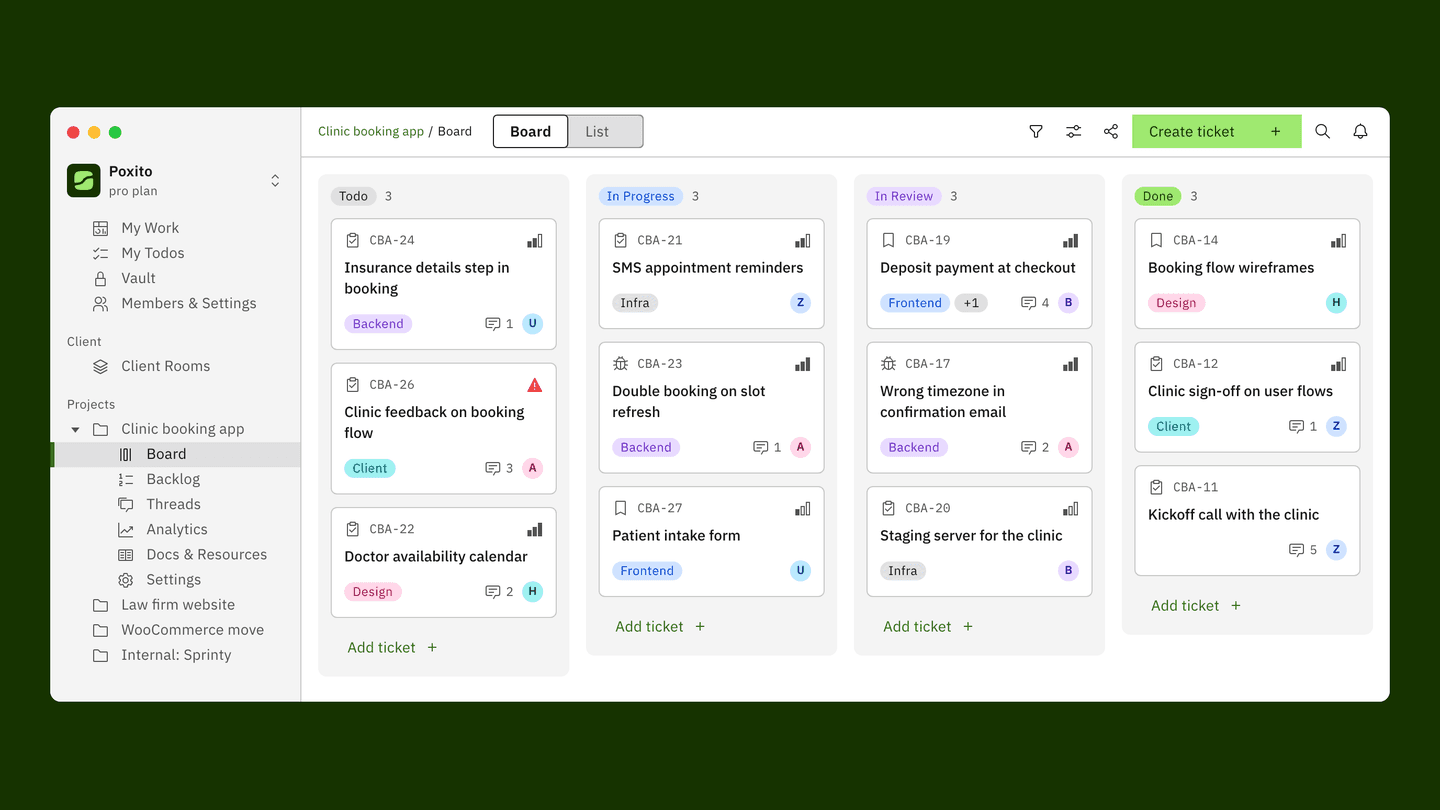
The team works on one board.
Tickets move across the board while the work happens. Decisions stay in Threads on the project, commits and pull requests show up on the ticket, and hours are logged against the work as it's done.
Screenshot coming · flow-ticketWhenever the client needs something
The client asks for the hosting login.
It's in the project's Vault, encrypted. Send it with a link that expires. Files, approvals and updates live in their own Client Room, and a public board lets them follow progress without asking.
Screenshot coming · flow-vaultWhen it's time to bill
The hours are already there.
At the milestone or the end of the month, every logged hour is waiting. Turn it into an invoice in a few lines, and see how the project did against its budget.
Screenshot coming · flow-invoice
Ever wondered why a two-day ticket took two weeks?
Sprinty shows you. Every ticket keeps its full history: when it was created, how long it sat in QA, who touched it and how many hours went in. Put that next to the project budget and you spot the problem while there's still time to fix it, instead of at the retro. Most tools leave that part to guesswork.
Keep an eye on the budget.
Hours used against the plan for every project, and who they went to. You see 78% used while there's still room to act.
Follow every ticket.
Time in each status, from Todo to QA to Done, with who moved it at every step. When a ticket waits three days in QA, you see it and you see why.
- Budget vs actualFor every project
- Time in each statusSpot where work waits
- Who did what, and whenThe full trail on every ticket
- Hours by personFrom timer and timesheets
Everything around the work.
Already inside Sprinty. Nothing to install, nothing to bolt on.
Boards and sprints
Plan the sprint, move the work, see it live.
Threads
Conversations stay on the project, so decisions don't get lost in chat.
Time tracking
A timer, timesheets and reports, logged against tickets.
Ticket history
When it was created, how long it sat in each status, who touched it.
Vault
Client logins, encrypted, shared with links that expire.
Public boards
Share a read-only board with a client or the world. No account needed to view it.
Client Rooms
One room per client for files, links and approvals.
Docs and Resources
Docs, files and links for every project, in one place.
Invoices and budgets
Bill a milestone from logged hours and see what the project earned.
Analytics
Burnup, velocity and cycle time, with no reports to build.
Talent Pool
See who's free next and invite contractors with one link.
Notification emails
Only the ones that need you: mentions, assignments, replies.
Mobile app
The board, comments and notifications in your pocket.
Your code shows up where the work is.
Connect GitHub and every branch, commit and pull request appears on its ticket. Merge the pull request and the ticket moves on its own. More integrations are on the way.
- GitHubBranches, commits and pull requests on tickets
- Claude, ChatGPT, GeminiBring your own AI, connected over MCP
- Jira importTickets, comments and sprints come across
- More coming soon
Bring your own AI.
Other tools add their own AI and sell you credits for it. Sprinty connects to the AI you already pay for, like Claude, ChatGPT or Gemini. It can read a brief and turn it into tickets, with your permissions.
- Read Clinic-brief.pdf · 12 pages
- Created 14 tasks in Clinic booking app · Sprint 25
- Assigned Hina 5 · Bilal 6 · Usman 3
Fifteen people. Compare the bill.
Every other tool here charges for each person you add. Sprinty charges once for the team, and the things you'd normally buy separately are already inside.
| Sprinty | Jira | Linear | ClickUp | Asana | Shortcut | |
|---|---|---|---|---|---|---|
| 15 people, per month | $19 | $127 | $150 | $180 | $202 | $150 |
| Plan compared | Team | Standard | Basic | Core | Starter | Team |
| How you pay | Per team | Per person | Per person | Per person | Per person | Per person |
| Time tracking and timesheets | Built in (Business) | Paid add-on | Not built in | Built in | Advanced plan | Not built in |
| Vault for client logins | Built in | No | No | No | No | No |
| Invoices from logged hours | Built in (Business) | No | No | No | No | No |
List prices from each vendor's pricing page, November 2026, billed monthly where offered (Linear shows yearly billing only).
One price for your whole team.
Your bill doesn't grow every time someone joins. Add people up to your plan's limit and the price stays the same.
Clients are always free
Invite every client and guest without buying them a seat.
Free means free
Up to 3 people and 3 projects, for as long as you like. No card to start.
No AI credits
Use the AI you already pay for. We don't charge you twice.
Try everything first
Every new workspace gets 14 days of Business, no card needed.
Free
$0
Up to 3 members and 3 projects
Team
$19 / month
Up to 15 members · bring your own AI · Vault
Business
$49 / month
Up to 30 members · timesheets, Client Rooms, invoices, budgets
Bring your projects with you.
Import from Jira today: tickets, comments and sprints come across. Importers for more tools are on the way.
Moving a whole company? Let's do it together.
Years of history, a few hundred tickets, a dozen clients' worth of logins. Talk to someone on our team and we'll plan the move with you and bring everything across.
A project tool your team won't hate.
Most teams put up with their tools. We built Sprinty for the teams who'd rather like theirs. Free for up to 3 people, 14 days of Business on us, no card.