Time tracking for software teams, without a separate tool
Ask a software team how they track time and you usually hear about two tools. The board is in one. The hours are in another, often Tempo, a time tracking app for Jira sold separately on the Atlassian Marketplace and priced per user.
It works, and plenty of teams run that way for years. People start looking for a Tempo alternative when they add up the second bill, or when they realise the hours still do not explain why work took as long as it did.
Two questions, and most tools answer one
How many hours did we spend? This is the timesheet question. It matters for billing, payroll and budgets.
Where did the time go? This is a different question. A ticket can have four hours logged and still take twelve days, because it waited eight days for review. Logged hours will never show that.
You need both answers to run a team well.
What good time tracking needs
A timer on the ticket. One click to start, visible while it runs.
Manual entry. People forget timers. Adding or fixing hours afterwards should be easy.
Timesheets with approval. A weekly view per person that a lead can check and approve, and that locks once approved.
Reports you can export. By project, person and period, to CSV.
Billable and non-billable. Marked at the time of logging.
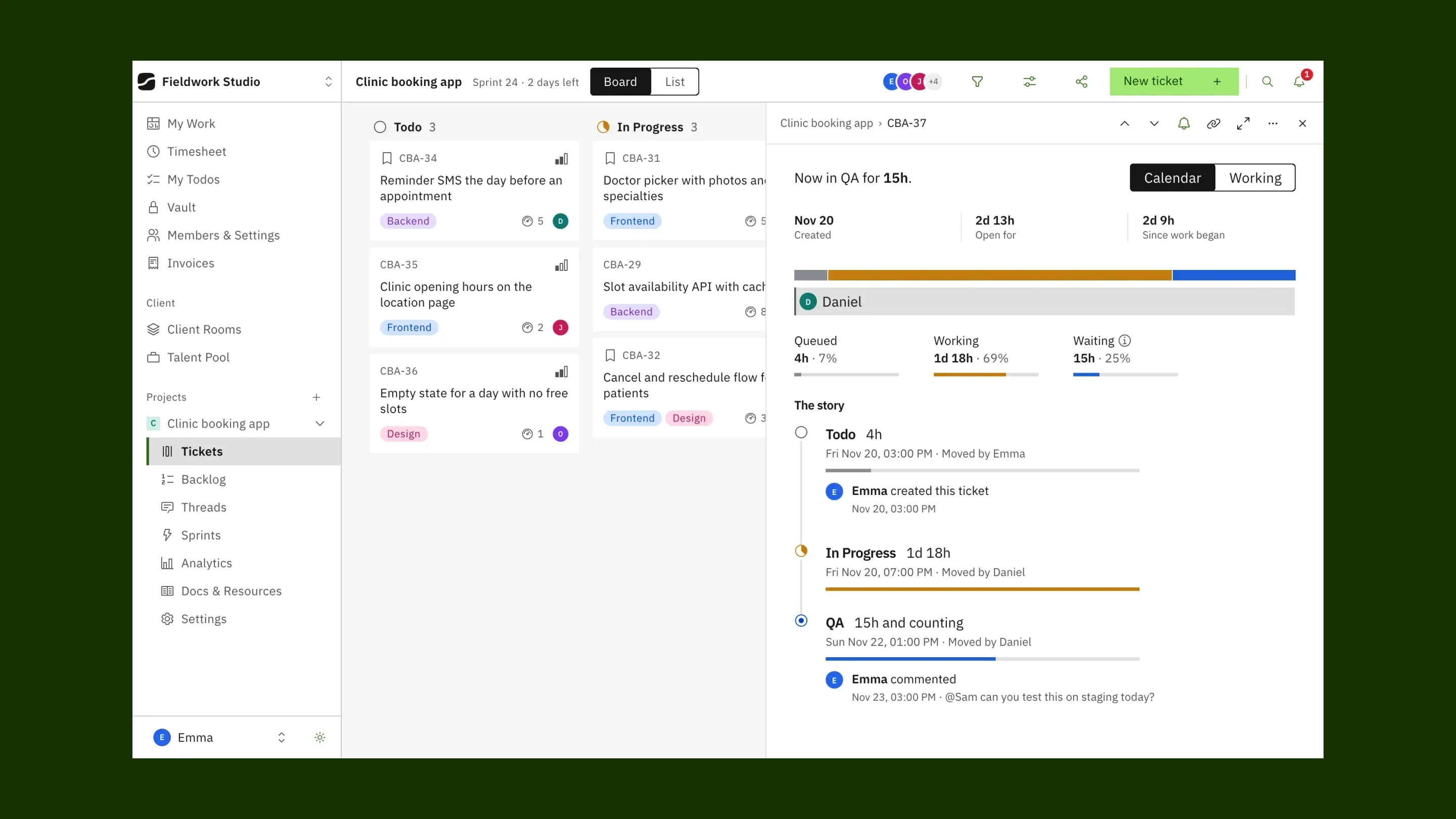
Time in status: the part most teams are missing
For every ticket, you should be able to see how long it spent in each column, who moved it and when. With that, a retro stops being a debate about feelings.
- "This took two weeks" becomes "this spent nine days in QA".
- You can see whether review or testing is the queue that keeps growing.
- You can explain a delay to a client with facts.
In Jira, time in status reports typically come from another marketplace app.
Budgets: hours against the plan
A project budget turns logged hours into a decision. Set the hours or the amount, and see every day how much is used and how much work is left. A warning at 80 percent gives you time to talk to the client before there is a problem.
For agencies: from hours to invoice
If you bill for time, the last step is the invoice. When hours are already approved on the timesheet, the invoice should be built from them directly, with nothing typed twice.
What tracking should never become
Time tracking is for understanding the work. It should not turn into watching people. No idle detection, no activity scores, no rankings. Teams log honest hours when they trust what the numbers are for.
How Sprinty works as a Tempo alternative
Manual hour logging is on every Sprinty plan. Business adds the timer, timesheets with approval, reports with CSV export, project budgets, invoices from logged hours and the ticket Story, which shows time in each status and who did what.
It is all one product at one price: $49 a month for up to 30 people, with no per-user time tracking fee on top. The time tracking and budgets guide shows how it works. Start free with 14 days of Business and no card.
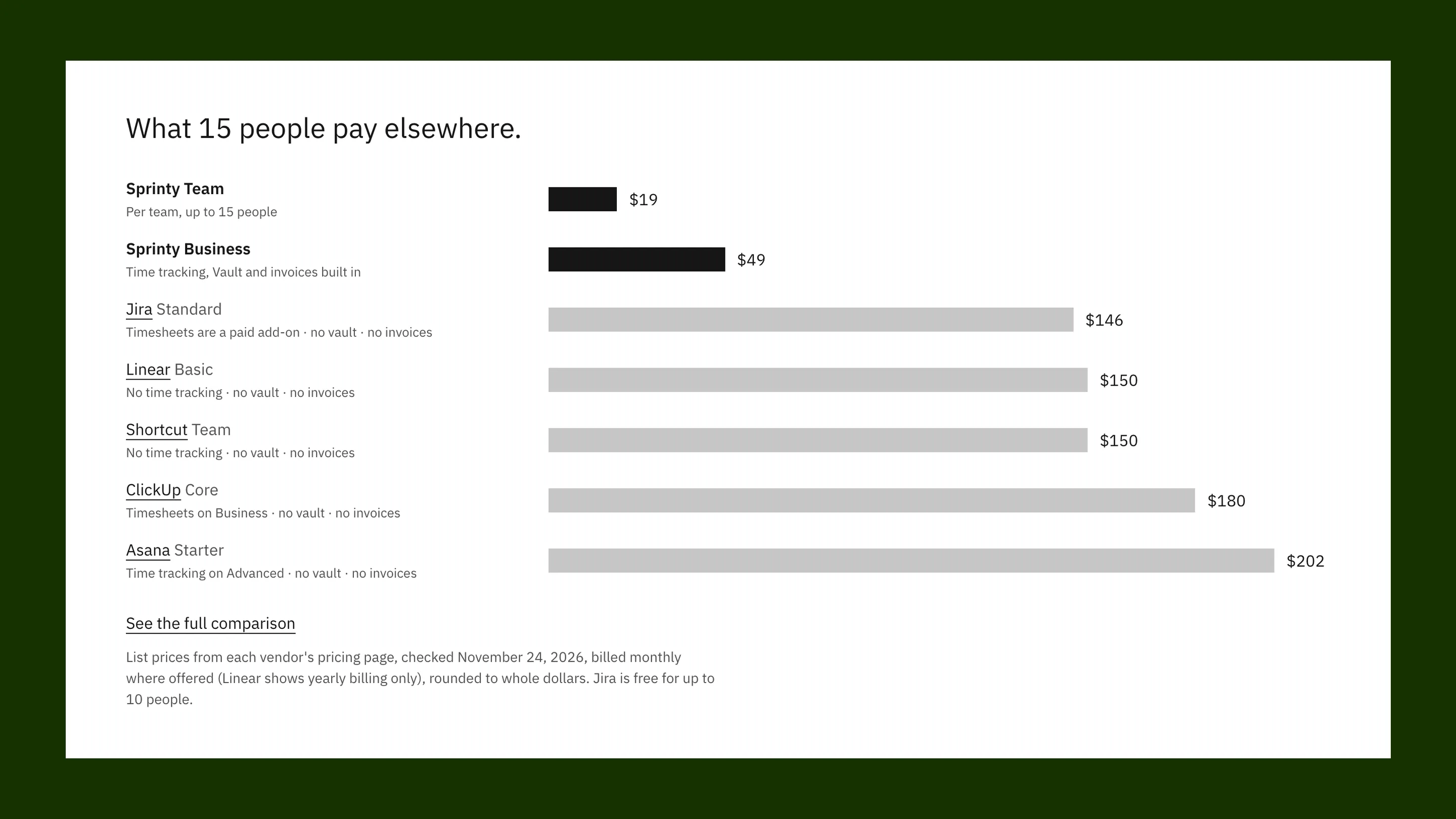
Related reading: what Jira, Linear, ClickUp and Asana cost a 15-person team and a Linear alternative for teams that work with clients.
Keep reading
Run your next project in Sprinty.
Start free